2026年11月16日に Qwen4-Max が正式リリースされました。 11月11日にPreviewが提供され、そのPreviewは11月25日までの期間限定だったのでてっきり11月25日とかに正式版リリースされると思っていたらPreview提供からわずか5日後の11月16日のリリースでした。
Alibaba Cloud のModel Studioの画面でどのようにリリースされているか簡単に紹介します。 また、1プロンプトでブラウザで動く”物理演算付きのボールが跳ねる時計”を作るテストも行いました。
目次
Alibaba Cloud Model Studio の画面紹介
Qwen4-max が利用可能になったことを Alibaba Cloud Model Studio の画面で紹介していきます。
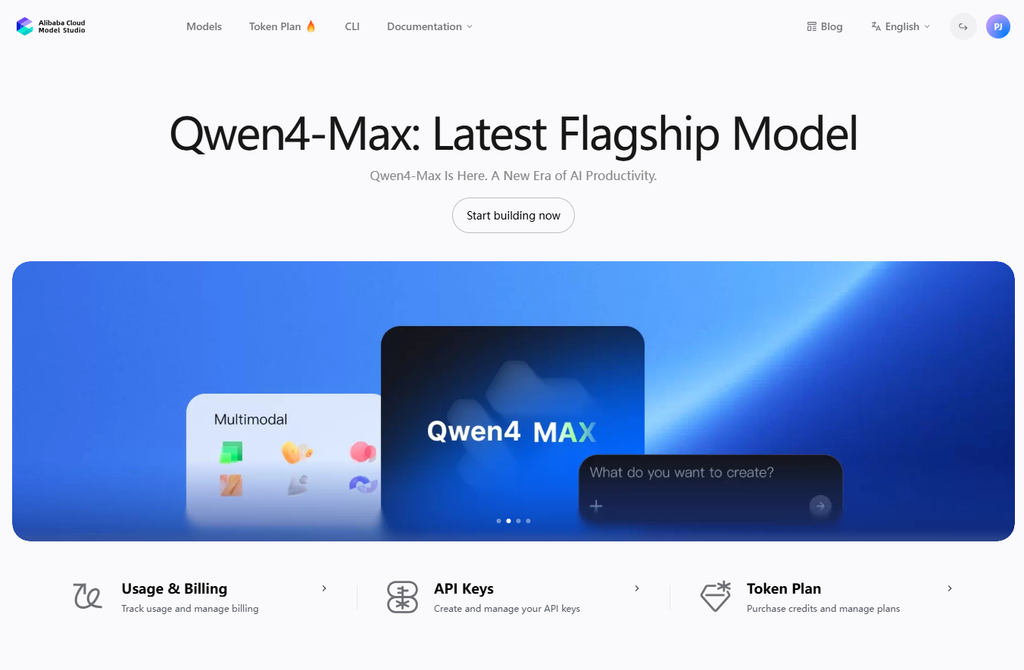
Model Studio の画面にアクセスするとデカデカと”Qwen4-Max: Latest Flagship Model”として案内されていますね。
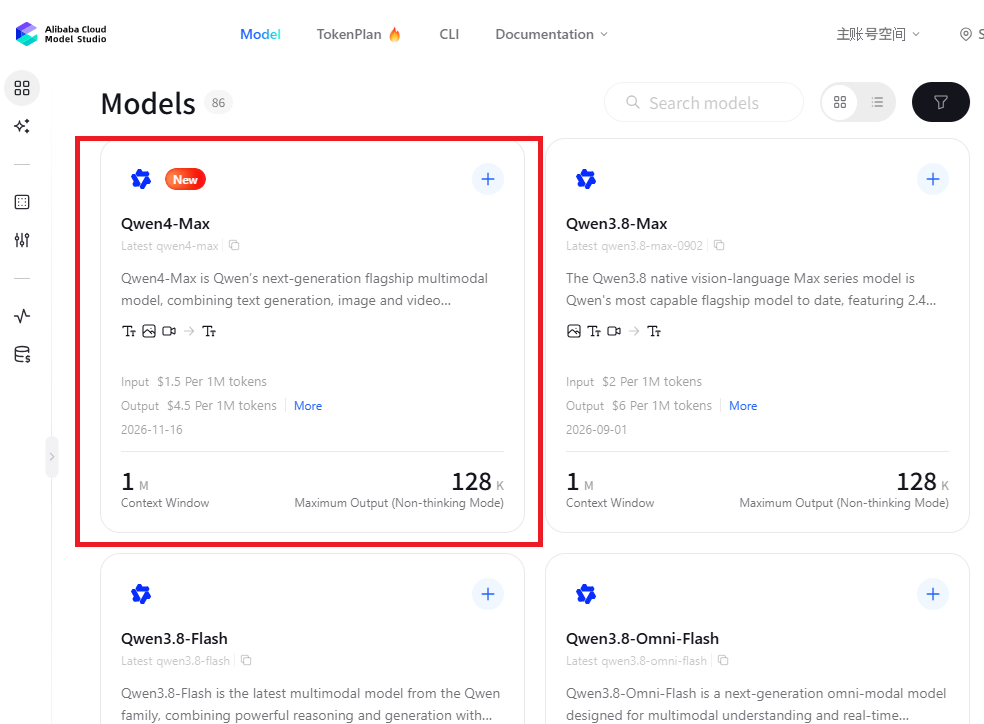
Modelsにアクセスすると、”Qwen4-Max”がNewとして利用できることが確認できます。
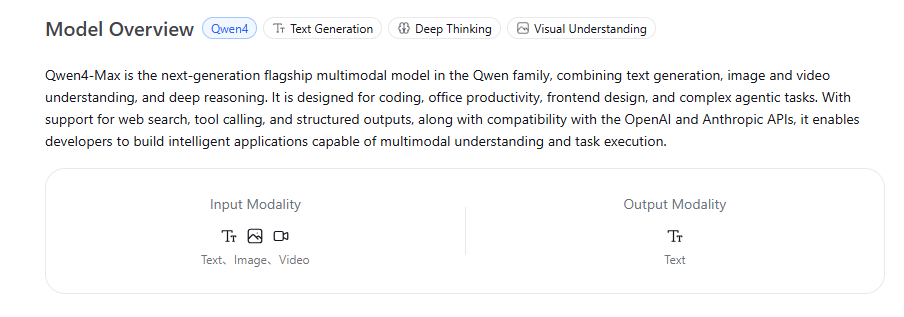
“More”から Qwen4-Max のOverview(概要)を確認できます。 日本語にまとめると
Qwen4-Max は、Qwenファミリーの次世代フラッグシップ・マルチモーダルモデルです。
- 統合されたマルチモーダル&推論能力: テキスト生成、画像・動画の理解、高度な推論(Deep Reasoning)を単一モデルで実現。
- 幅広い得意領域: コーディング、オフィス業務の効率化、フロントエンド設計、複雑なエージェントタスクに最適化。
- 豊富な開発者向け機能: Web検索、ツール呼び出し(Tool Calling)、構造化出力に対応。
- 高いAPI互換性: OpenAIおよびAnthropicのAPIと互換性があり、マルチモーダル理解とタスク実行を備えたアプリを容易に構築可能。
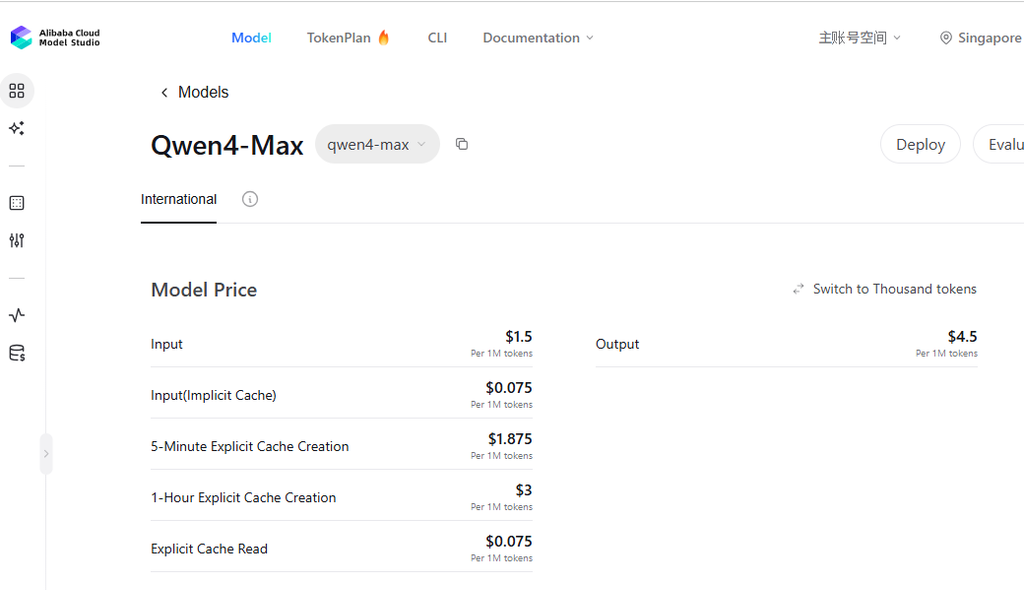
Model Price も確認することができます。 100万トークンあたりで、Inputで1.5USD、Outputで4.5USDです。
Priceは2026/11/22時点のものです。 最新のものは公式サイトで確認してください。
| 項目 | Price (Per 1M tokens) |
|---|---|
| Input | 1.5USD |
| Input(Implicit Cache) | $0.075 |
| 5-Minute Explicit Cache Creation | $1.875 |
| 1-Hour Explicit Cache Creation | $3 |
| Explicit Cache Read | $0.075 |
| Output | $4.5 |
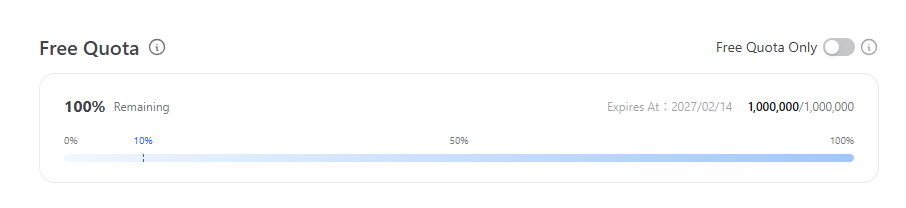
無償利用枠は 100万トークンです。
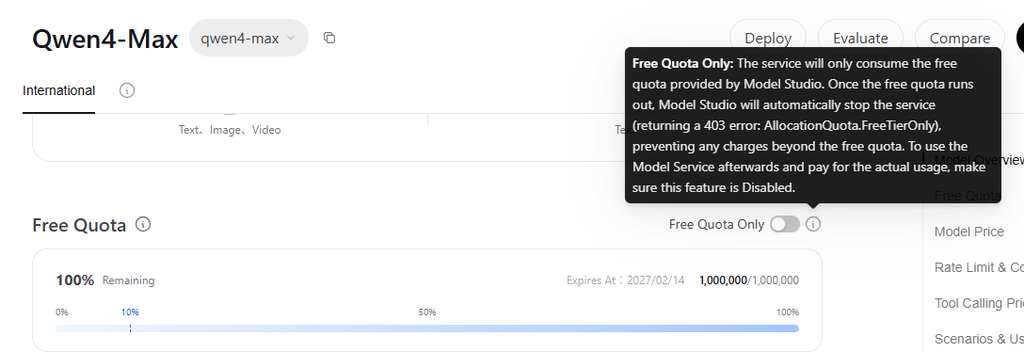
右上にスライドバーで”Free Quota Only”があります。 (i)にマウスオーバーしてこの設定の意味を確認できます。
Model Studio が提供する無料枠のみを消費します。無料枠を使い切ると、Model Studio は自動的にサービスを停止し(403エラー:AllocationQuota.FreeTierOnly が返されます)、無料枠を超えた課金が発生するのを防ぎます。無料枠の消費後に従量課金でモデルサービスを継続利用したい場合は、この機能が「無効(Disabled)」になっていることを確認してください。 とのこと。
とりあえずテストしたい、追加の課金を発生させたくない場合は有効にすると良いでしょう。
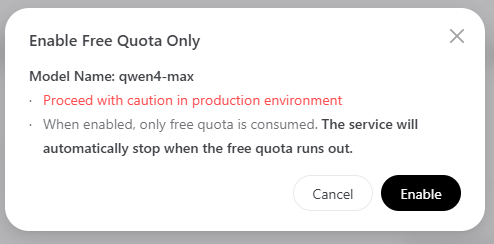
オンにすると以下警告。 警告というかポジティブな注意喚起ですね。(本番環境でこれを有効にしてFree Quota使い切るとサービスは停止するよ、と)
Model Studio の画面では様々なユースケースについて紹介もあります。
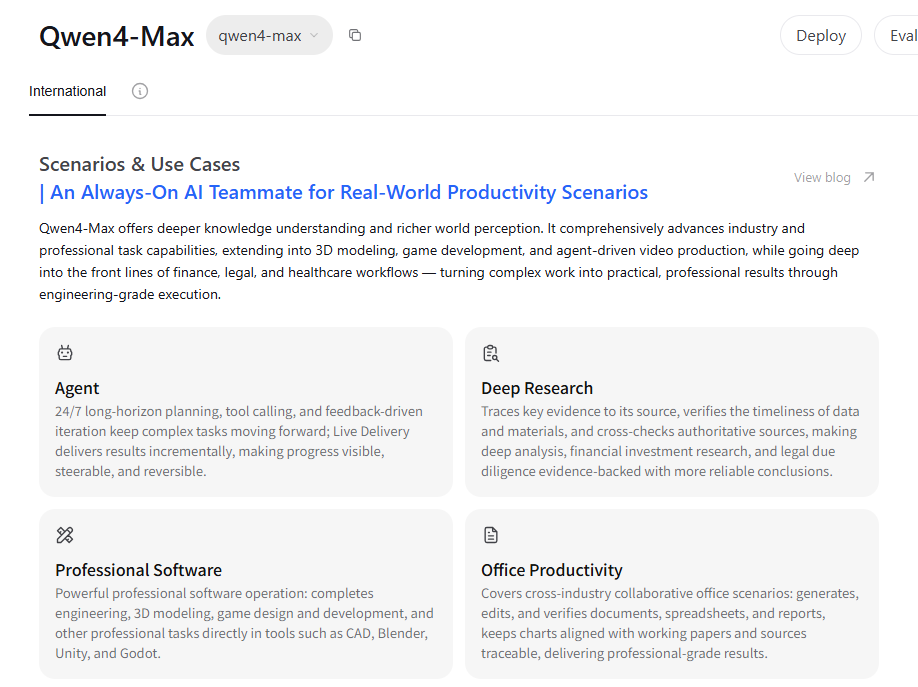
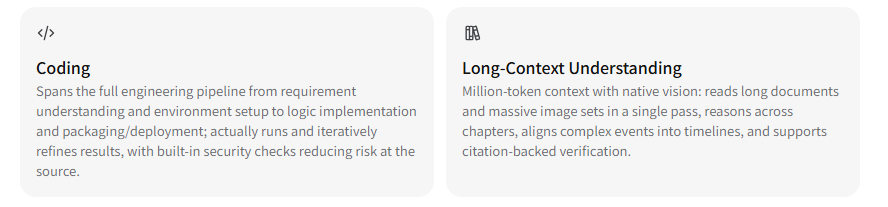
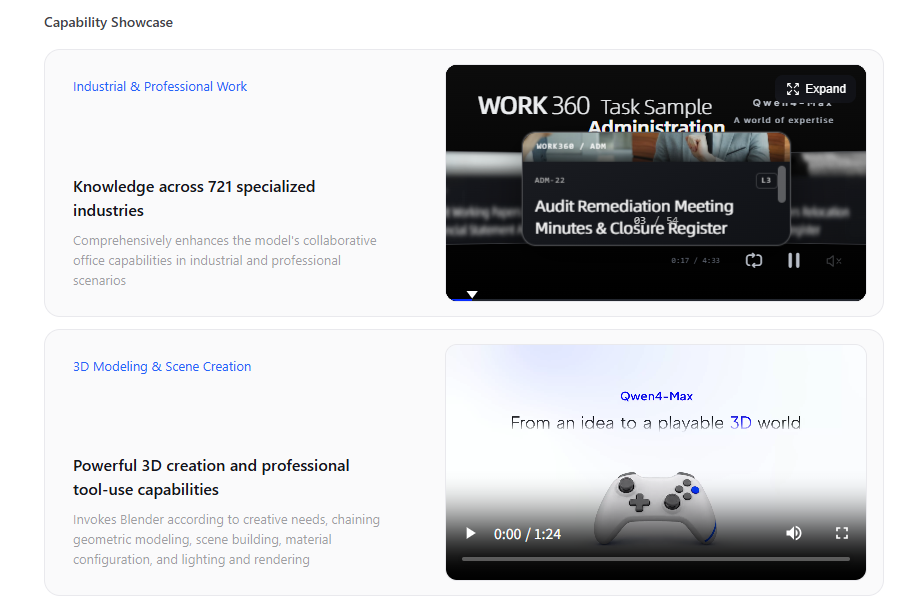
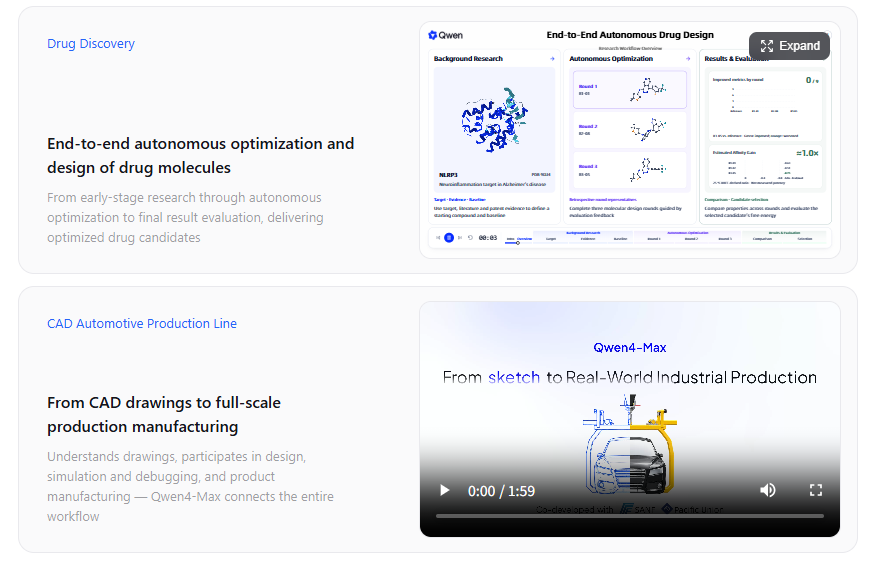
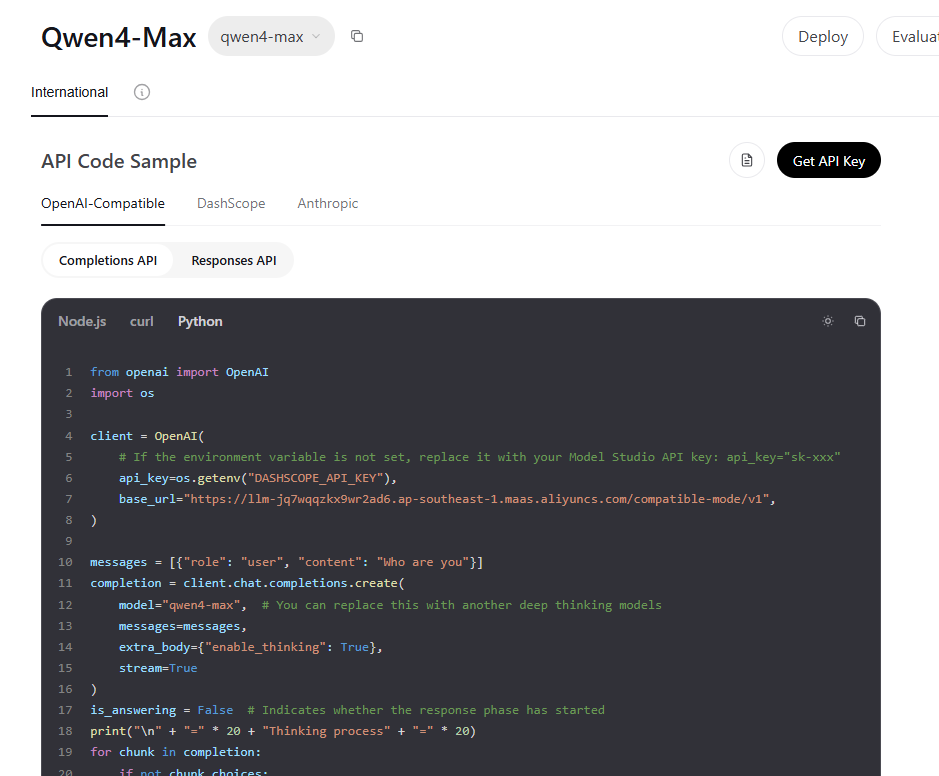
チャット(text)の利用イメージ
Playgroundのtextからチャットを利用可能です。
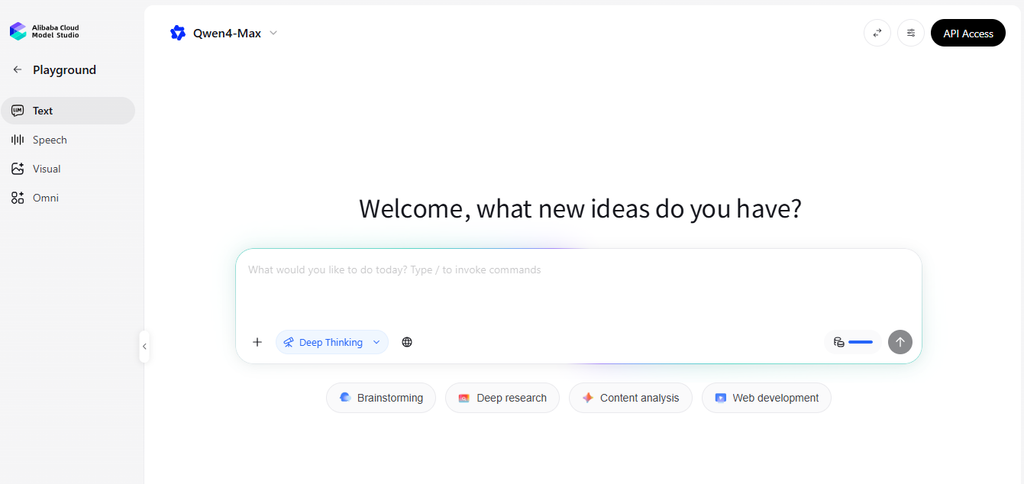
テスト#1 ちょっとした問答
Q1 “『AI』『人工知能』『学習』という単語を一切使わずに、機械学習の仕組みを100文字以内で説明してください。”
A1 “大量の例から規則性を見つけ、予測と正解のずれが縮まるよう内部の数値を自動で調整し続ける。こうして得た規則で、未知の例にも答えを返せる。”

テスト#2 プログラム生成
Q2 “HTML/CSS/JavaScriptを1つのファイルにまとめて、ブラウザで動く『物理演算付きのボールが跳ねる時計』または『テトリス風のミニゲーム』のコードを書いてください。”
A2 135秒で一発で生成(まだ動くかはためしていませんが)。 Outputトークンは8,442
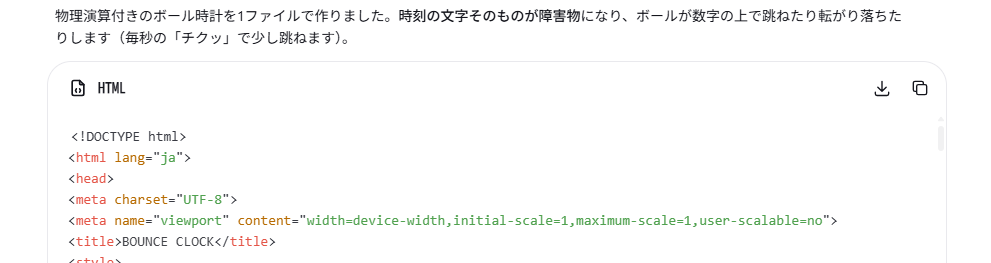
(中略)
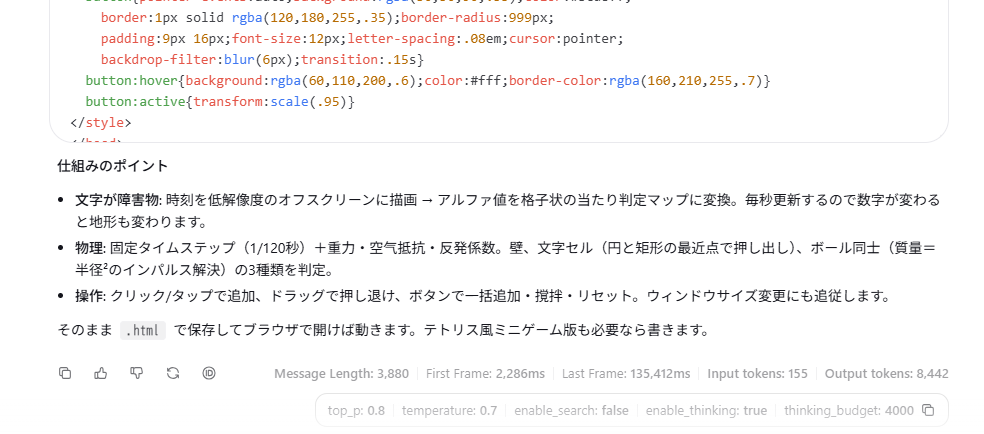
以下がQwen4-Max が出力したコード。
<!DOCTYPE html>
<html lang="ja">
<head>
<meta charset="UTF-8">
<meta name="viewport" content="width=device-width,initial-scale=1,maximum-scale=1,user-scalable=no">
<title>BOUNCE CLOCK</title>
<style>
  *{margin:0;padding:0;box-sizing:border-box}
  html,body{width:100%;height:100%;overflow:hidden;background:#080a12;
    font-family:"Helvetica Neue",Arial,"Hiragino Kaku Gothic ProN",Meiryo,sans-serif;
    -webkit-user-select:none;user-select:none}
  #c{display:block;touch-action:none;cursor:crosshair}
  .ui{position:fixed;inset:0;pointer-events:none;color:#cfe4ff}
  .top{position:absolute;top:18px;left:20px}
  .logo{font-size:13px;letter-spacing:.32em;color:#6fb7ff;font-weight:700}
  .date{margin-top:6px;font-size:12px;letter-spacing:.12em;color:#7f93b5}
  .count{margin-top:4px;font-size:11px;color:#4d5f7e;font-variant-numeric:tabular-nums}
  .hint{position:absolute;bottom:18px;left:20px;font-size:11px;color:#54658a;line-height:1.7}
  .btns{position:absolute;bottom:16px;right:18px;display:flex;gap:8px;pointer-events:auto}
  button{pointer-events:auto;background:rgba(30,50,90,.55);color:#bcd8ff;
    border:1px solid rgba(120,180,255,.35);border-radius:999px;
    padding:9px 16px;font-size:12px;letter-spacing:.08em;cursor:pointer;
    backdrop-filter:blur(6px);transition:.15s}
  button:hover{background:rgba(60,110,200,.6);color:#fff;border-color:rgba(160,210,255,.7)}
  button:active{transform:scale(.95)}
</style>
</head>
<body>
<canvas id="c"></canvas>
<div class="ui">
  <div class="top">
    <div class="logo">BOUNCE CLOCK</div>
    <div class="date" id="date"></div>
    <div class="count" id="count"></div>
  </div>
  <div class="hint">クリック / タップ:ボール追加<br>ドラッグ:かき混ぜる</div>
  <div class="btns">
    <button id="add">+10</button>
    <button id="shake">ゆらす</button>
    <button id="reset">リセット</button>
  </div>
</div>

<script>
(() => {
'use strict';
const cvs = document.getElementById('c');
const ctx = cvs.getContext('2d');
// 文字形状の当たり判定用オフスクリーン(低解像度でサンプリング)
const mask = document.createElement('canvas');
const mctx = mask.getContext('2d', { willReadFrequently: true });

const CELL = 9;          // 当たり判定グリッドの1マス(px)
const G = 1500;          // 重力加速度
const REST = 0.68;       // 反発係数
const MAX = 170;         // ボール上限
const STEP = 1 / 120;    // 物理の固定タイムステップ

let W = 0, H = 0, cols = 1, rows = 1, grid = new Uint8Array(1);
let fontSize = 100, textX = 0, textY = 0, fontStr = '';
let balls = [], timeStr = '', lastSec = -1;
const pointer = { x: 0, y: 0, down: false };

const pad = n => String(n).padStart(2, '0');
const rnd = (a, b) => a + Math.random() * (b - a);

/* ---------- サイズ変更 ---------- */
function resize() {
  const dpr = Math.min(window.devicePixelRatio || 1, 2);
  W = window.innerWidth; H = window.innerHeight;
  cvs.width = W * dpr; cvs.height = H * dpr;
  cvs.style.width = W + 'px'; cvs.style.height = H + 'px';
  ctx.setTransform(dpr, 0, 0, dpr, 0, 0);

  cols = Math.max(1, Math.ceil(W / CELL));
  rows = Math.max(1, Math.ceil(H / CELL));
  mask.width = cols; mask.height = rows;

  fontSize = Math.min(W * 0.21, H * 0.36);
  fontStr = `bold ${fontSize}px ui-monospace,Menlo,Consolas,monospace`;
  textX = W / 2; textY = H * 0.48;

  buildMask(timeStr);
  for (const b of balls) {
    b.x = Math.min(Math.max(b.x, b.r), W - b.r);
    b.y = Math.min(Math.max(b.y, b.r), H - b.r);
  }
  ctx.fillStyle = '#080a12'; ctx.fillRect(0, 0, W, H);
}

/* ---------- 時刻の文字をグリッド化 ---------- */
function buildMask(str) {
  mctx.setTransform(1, 0, 0, 1, 0, 0);
  mctx.clearRect(0, 0, cols, rows);
  mctx.save();
  mctx.scale(1 / CELL, 1 / CELL);
  mctx.font = fontStr; mctx.textAlign = 'center'; mctx.textBaseline = 'middle';
  mctx.fillStyle = '#fff';
  mctx.fillText(str, textX, textY);
  mctx.restore();
  const d = mctx.getImageData(0, 0, cols, rows).data;
  grid = new Uint8Array(cols * rows);
  for (let i = 0; i < grid.length; i++) grid[i] = d[i * 4 + 3] > 60 ? 1 : 0;
}

/* ---------- ボール ---------- */
function spawn(x, y, vx, vy) {
  const r = rnd(7, 16);
  balls.push({
    x, y, vx, vy, r, m: r * r,
    color: `hsl(${(Date.now() / 40 + rnd(0, 60)) % 360} 90% 63%)`
  });
  while (balls.length > MAX) balls.shift();
}
function burst(x, y, n) {
  for (let i = 0; i < n; i++) spawn(x + rnd(-14, 14), y + rnd(-14, 14), rnd(-260, 260), rnd(-160, 60));
}

/* ---------- 文字グリッドとの衝突 ---------- */
function collideGrid(b) {
  const c0 = Math.max(0, Math.floor((b.x - b.r) / CELL));
  const c1 = Math.min(cols - 1, Math.floor((b.x + b.r) / CELL));
  const r0 = Math.max(0, Math.floor((b.y - b.r) / CELL));
  const r1 = Math.min(rows - 1, Math.floor((b.y + b.r) / CELL));
  for (let ry = r0; ry <= r1; ry++) {
    for (let cx = c0; cx <= c1; cx++) {
      if (!grid[ry * cols + cx]) continue;
      const rx = cx * CELL, ryy = ry * CELL;
      // 矩形上の最近点
      const px = Math.max(rx, Math.min(b.x, rx + CELL));
      const py = Math.max(ryy, Math.min(b.y, ryy + CELL));
      let dx = b.x - px, dy = b.y - py, d2 = dx * dx + dy * dy, nx, ny, pen;
      if (d2 > b.r * b.r) continue;
      if (d2 > 1e-6) {
        const d = Math.sqrt(d2); nx = dx / d; ny = dy / d; pen = b.r - d;
      } else { // 中心がめり込んだ場合は浅い軸へ押し出す
        const mx = rx + CELL / 2, my = ryy + CELL / 2;
        const ox = (CELL / 2 + b.r) - Math.abs(b.x - mx);
        const oy = (CELL / 2 + b.r) - Math.abs(b.y - my);
        if (ox < oy) { nx = Math.sign(b.x - mx) || 1; ny = 0; pen = ox; }
        else { nx = 0; ny = Math.sign(b.y - my) || 1; pen = oy; }
      }
      b.x += nx * pen; b.y += ny * pen;
      const vn = b.vx * nx + b.vy * ny;
      if (vn < 0) {
        b.vx -= (1 + REST) * vn * nx;
        b.vy -= (1 + REST) * vn * ny;
        const tx = -ny, ty = nx, vt = b.vx * tx + b.vy * ty; // 接線方向の摩擦
        b.vx -= vt * 0.07 * tx; b.vy -= vt * 0.07 * ty;
      }
    }
  }
}

/* ---------- ボール同士の衝突 ---------- */
function collideBalls() {
  for (let i = 0; i < balls.length; i++) {
    const a = balls[i];
    for (let j = i + 1; j < balls.length; j++) {
      const b = balls[j];
      const dx = b.x - a.x, dy = b.y - a.y, rs = a.r + b.r, d2 = dx * dx + dy * dy;
      if (d2 >= rs * rs || d2 < 1e-6) continue;
      const d = Math.sqrt(d2), nx = dx / d, ny = dy / d, ov = rs - d;
      const tot = a.m + b.m;
      a.x -= nx * ov * (b.m / tot); a.y -= ny * ov * (b.m / tot);
      b.x += nx * ov * (a.m / tot); b.y += ny * ov * (a.m / tot);
      const rv = (b.vx - a.vx) * nx + (b.vy - a.vy) * ny;
      if (rv < 0) {
        const imp = -(1 + 0.55) * rv / (1 / a.m + 1 / b.m);
        a.vx -= imp * nx / a.m; a.vy -= imp * ny / a.m;
        b.vx += imp * nx / b.m; b.vy += imp * ny / b.m;
      }
    }
  }
}

/* ---------- 物理ステップ ---------- */
function physics(h) {
  for (const b of balls) {
    b.vy += G * h;
    b.vx *= 1 - 0.25 * h; b.vy *= 1 - 0.05 * h; // 空気抵抗
    if (pointer.down) { // ドラッグで押し退ける
      const dx = b.x - pointer.x, dy = b.y - pointer.y, d2 = dx * dx + dy * dy;
      if (d2 < 150 * 150 && d2 > 1) {
        const d = Math.sqrt(d2), f = (1 - d / 150) * 2600 * h;
        b.vx += dx / d * f; b.vy += dy / d * f;
      }
    }
    b.x += b.vx * h; b.y += b.vy * h;

    if (b.x < b.r) { b.x = b.r; b.vx = Math.abs(b.vx) * REST; }
    if (b.x > W - b.r) { b.x = W - b.r; b.vx = -Math.abs(b.vx) * REST; }
    if (b.y < b.r) { b.y = b.r; b.vy = Math.abs(b.vy) * REST; }
    if (b.y > H - b.r) { b.y = H - b.r; b.vy = -Math.abs(b.vy) * REST; b.vx *= 0.96; }

    collideGrid(b);
    const sp = Math.hypot(b.vx, b.vy);
    if (sp > 2600) { b.vx *= 2600 / sp; b.vy *= 2600 / sp; }
  }
  collideBalls();
}

/* ---------- 描画 ---------- */
function render() {
  ctx.fillStyle = 'rgba(8,10,18,0.30)'; // 残像
  ctx.fillRect(0, 0, W, H);

  ctx.save();
  ctx.font = fontStr; ctx.textAlign = 'center'; ctx.textBaseline = 'middle';
  const g = ctx.createLinearGradient(0, textY - fontSize * .6, 0, textY + fontSize * .6);
  g.addColorStop(0, '#8fefff'); g.addColorStop(1, '#3556ff');
  ctx.shadowColor = 'rgba(70,150,255,.6)'; ctx.shadowBlur = 28;
  ctx.fillStyle = g; ctx.fillText(timeStr, textX, textY);
  ctx.shadowBlur = 0;
  ctx.lineWidth = 1.2; ctx.strokeStyle = 'rgba(210,240,255,.35)';
  ctx.strokeText(timeStr, textX, textY);
  ctx.restore();

  for (const b of balls) {
    ctx.beginPath(); ctx.arc(b.x, b.y, b.r, 0, 6.2832);
    ctx.fillStyle = b.color; ctx.fill();
    ctx.beginPath(); ctx.arc(b.x - b.r * .3, b.y - b.r * .35, b.r * .3, 0, 6.2832);
    ctx.fillStyle = 'rgba(255,255,255,.45)'; ctx.fill();
  }
}

/* ---------- メインループ ---------- */
let last = performance.now(), acc = 0;
function frame(now) {
  let dt = (now - last) / 1000; last = now;
  if (dt > 0.05) dt = 0.05;
  acc += dt;
  while (acc >= STEP) { physics(STEP); acc -= STEP; }

  const d = new Date();
  const s = d.getSeconds();
  const str = `${pad(d.getHours())}:${pad(d.getMinutes())}:${pad(s)}`;
  if (str !== timeStr) {
    timeStr = str; buildMask(str);
    if (s !== lastSec) { // 1秒ごとの「チクッ」
      lastSec = s;
      for (const b of balls) { b.vy -= rnd(50, 130); b.vx += rnd(-60, 60); }
      if (balls.length < 90) spawn(rnd(W * .15, W * .85), -20, rnd(-80, 80), 0);
      document.title = str + ' BOUNCE CLOCK';
      document.getElementById('date').textContent =
        `${d.getFullYear()}.${pad(d.getMonth() + 1)}.${pad(d.getDate())} ` +
        '日月火水木金土'[d.getDay()];
      document.getElementById('count').textContent = 'BALLS ' + balls.length;
    }
  }
  render();
  requestAnimationFrame(frame);
}

/* ---------- 入力 ---------- */
function pos(e) { const r = cvs.getBoundingClientRect(); return { x: e.clientX - r.left, y: e.clientY - r.top }; }
cvs.addEventListener('pointerdown', e => {
  const p = pos(e); pointer.x = p.x; pointer.y = p.y; pointer.down = true;
  burst(p.x, p.y, 6); cvs.setPointerCapture(e.pointerId);
});
cvs.addEventListener('pointermove', e => {
  const p = pos(e); pointer.x = p.x; pointer.y = p.y;
  if (pointer.down && Math.random() < 0.25) spawn(p.x, p.y, rnd(-120, 120), rnd(-80, 80));
});
addEventListener('pointerup', () => pointer.down = false);
addEventListener('pointercancel', () => pointer.down = false);
document.getElementById('add').onclick = () => burst(W / 2, H * 0.15, 10);
document.getElementById('shake').onclick = () => {
  for (const b of balls) { b.vx += rnd(-700, 700); b.vy -= rnd(200, 900); }
};
document.getElementById('reset').onclick = () => { balls = []; };
addEventListener('resize', resize);

/* ---------- 起動 ---------- */
const n = new Date();
timeStr = `${pad(n.getHours())}:${pad(n.getMinutes())}:${pad(n.getSeconds())}`;
resize();
for (let i = 0; i < 45; i++) spawn(rnd(0, W), rnd(-H * .5, H * .3), rnd(-150, 150), 0);
requestAnimationFrame(frame);
})();
</script>
</body>
</html>
出来上がったものをGIF動画にしました。 サイズの関係で3秒程度ですが、雰囲気はわかると思います。
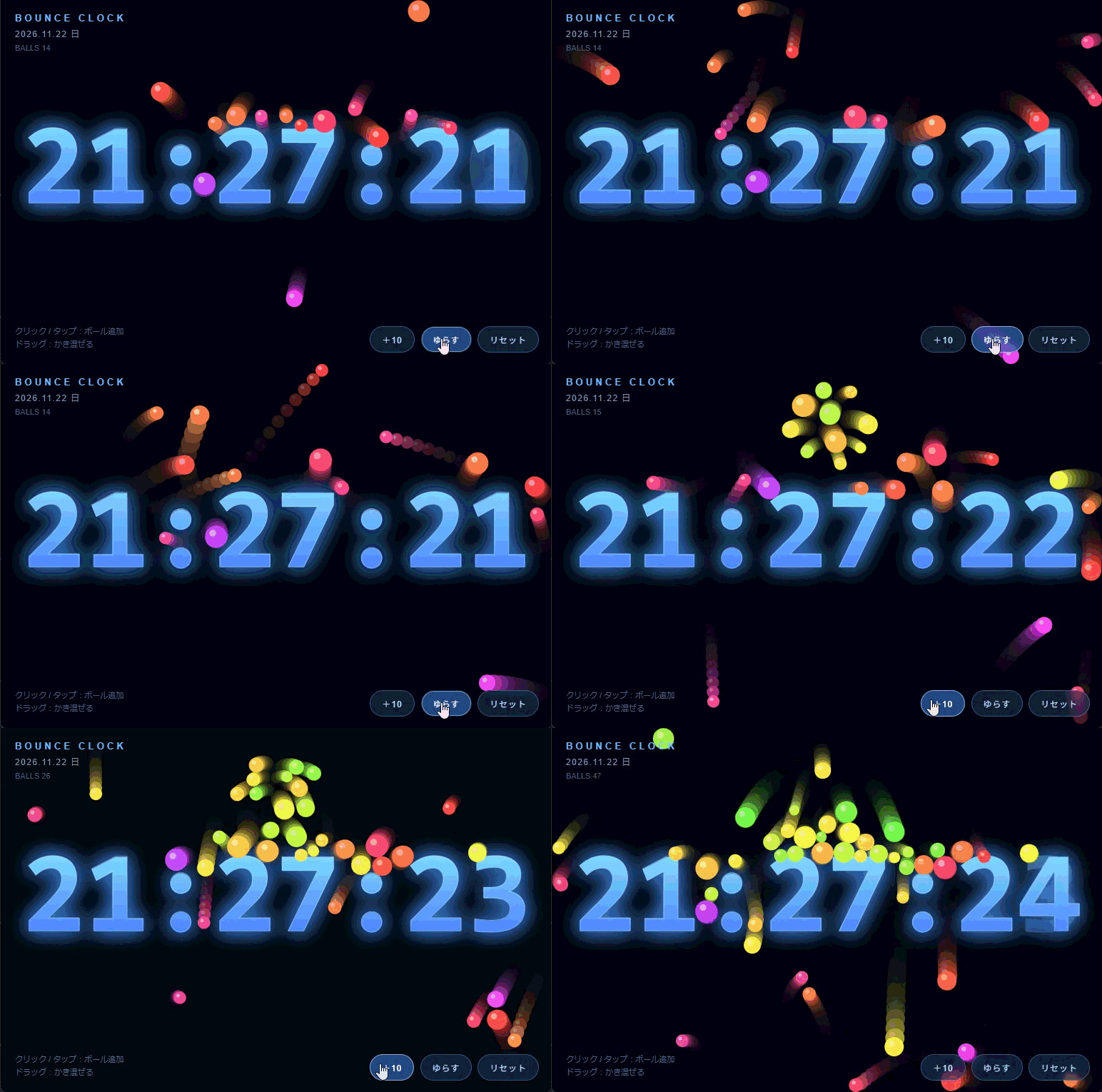
ただ、これだけだと、すでにある、どこかに転がっているコードをただ持ってきた可能性もありますが、そこは Qwen の思考過程を確認することでしっかりとリアルタイムに作成していることがわかります。
The user wants a single HTML file with either a physics bouncing ball clock or a Tetris-like mini game. Let me pick one — maybe the bouncing ball clock is more unique and interesting. Actually let me do the physics ball clock: balls bouncing with gravity, and the clock display... Let me design something cool: digits formed by balls? Or balls bouncing inside a container with time displayed, where each second spawns a ball, and balls collide.

Let me make a nice "物理演算付きのボールが跳ねる時計": a canvas where the current time HH:MM:SS is displayed as large text, and balls bounce around with gravity, collisions with walls and each other, and the digits act as obstacles? That's complex. Simpler and impressive: balls bounce and collide, and the clock digits are rendered as pixel-grid obstacles made of static circles that balls bounce off. Hmm, that could be heavy but doable.

Alternative simpler design: Big time text in center; balls bounce with gravity and restitution, ball-ball collisions, and each second a new ball drops with the second's number. Also balls collide with the digit shapes rendered as a grid mask (sample text pixels offscreen canvas → static collision cells). That's actually quite feasible: render time text to offscreen canvas, sample at grid resolution (e.g., 8px), build occupancy grid, and for ball collision check nearby cells and resolve as AABB circle collision. Update mask each second. Balls resting on digits look nice.

Let me implement:

Canvas full window, resize handling.
Offscreen canvas for text mask, grid cell size ~10px.
Each frame (or when time string changes) rebuild mask.
Balls: array with x,y,vx,vy,r,color. Gravity ~1200 px/s², restitution 0.75, friction.
Ball-ball collision: simple impulse resolution, O(n²) with n ~ 60-120 fine.
Spawn: click/tap to add balls, auto spawn every second up to max ~90, remove oldest.
Substeps for stability: dt fixed 1/120, 2 substeps per frame.
Mask collision: for each ball, check cells overlapping bounding box; if solid, compute closest point on cell rect to ball center, push out, reflect velocity along normal with restitution.
Digits drawn as glowing rounded rects for solid cells (or draw text directly with fillText for crisp look, and mask invisible). Better: draw the text with fillText glow, mask invisible but derived from same text. Balls appear to bounce off the numbers. Nice.
Also show date and small label. Controls: gravity slider? Keep minimal: buttons for reset, add balls, toggle gravity direction? Keep a small hint text.
Careful: text mask sampling must match drawn text exactly (same font, size, position). Use offscreen canvas same size as main canvas (or scaled down by cell size). Draw text at same coords with same font on mask canvas at full resolution then read pixels once per second — getImageData full canvas each second is fine (e.g., 1920x1080 = 8MB read, once per second, acceptable but maybe slow-ish). Better: mask canvas at reduced resolution: width/cell, height/cell, and draw text scaled by 1/cell using ctx.scale(1/cell,1/cell). Then getImageData small. Good.

Font: use monospace bold, size based on canvas width: fontSize = min(width0.22, height0.4). Time string "HH:MM:SS". Colon cells thin—fine.

Grid: cols = ceil(w/CELL), rows = ceil(h/CELL). Solid if alpha > 100.

Collision resolution with cells: iterate cells in ball's AABB range; for solid cell, closest point clamp; dx = ball.x - cx etc.; if dist < r: normal = (dx,dy)/dist; if dist==0 (center inside cell) push out via smallest penetration axis. Then position correction and velocity reflection: vn = v·n; if vn<0: v -= (1+e)vnn; apply tangential friction.

To avoid jitter, multiple iterations maybe 2.

Also balls resting on top of digits with gravity will pile — nice.

Ball-ball: equal mass proportional to r²? Use mass = r². Impulse-based separation.

Add mouse drag interaction: pointer attracts/repels? Simpler: click spawns ball at pointer; drag creates a "wind"/push. Let's do: pointer down spawns balls continuously while held (throttled), and moving pointer pushes nearby balls (repel). Keep it simple: click/tap = spawn 5 balls; there's a shake button that gives random impulses.

Also color palette based on HSL by index/time.

Performance: cap balls at 140.

Let me also handle devicePixelRatio: set canvas width = w*dpr, use ctx.setTransform(dpr,0,0,dpr,0,0). Mask uses CSS pixel coords scaled.

Let me write the code carefully.

Structure:

<!DOCTYPE html>
<html lang="ja">
<head>meta, title, style</head>
<body>
<canvas id="c"></canvas>
<div class="ui">...</div>
<script>...</script>
</body>
</html>
UI: top-left title "BOUNCE CLOCK", date; bottom hint; buttons: ボール追加 / リセット / 重力反転? Let's include "ゆらす" (shake) and "リセット". And a checkbox for showing seconds? Keep it modest.

Time text: HH:MM:SS with blinking colon? Colon blink would change mask each 0.5s — fine, but let's keep steady.

Implementation details:

const cvs = document.getElementById('c');
const ctx = cvs.getContext('2d');
const mask = document.createElement('canvas');
const mctx = mask.getContext('2d', {willReadFrequently:true});
const CELL = 9;
let W=0,H=0,DPR=1, cols=0, rows=0, grid=null;
let fontSize=0, textX=0, textY=0, timeStr='';
resize():

DPR = Math.min(devicePixelRatio||1, 2);
W = innerWidth; H = innerHeight;
cvs.width = W*DPR; cvs.height=H*DPR;
cvs.style.width=W+'px'; ...
ctx.setTransform(DPR,0,0,DPR,0,0);
cols = Math.ceil(W/CELL); rows=Math.ceil(H/CELL);
mask.width=cols; mask.height=rows;
fontSize = Math.min(W*0.20, H*0.34);
textX = W/2; textY = H*0.52;
buildMask(force)
// keep balls inside
font string: 900 ${fontSize}px "Helvetica Neue", Arial, sans-serif — but digits width; use bold ${fontSize}px ui-monospace, "SFMono-Regular", Menlo, monospace. Monospace ensures stable width. textAlign center, textBaseline middle.

buildMask(str):

mctx.setTransform(1,0,0,1,0,0);
mctx.clearRect(0,0,cols,rows);
mctx.save();
mctx.scale(1/CELL,1/CELL);
mctx.font = fontStr; mctx.textAlign='center'; mctx.textBaseline='middle';
mctx.fillStyle='#fff';
mctx.fillText(str, textX, textY);
mctx.restore();
const d = mctx.getImageData(0,0,cols,rows).data;
grid = new Uint8Array(cols*rows);
for(i...) grid[i] = d[i*4+3] > 90 ? 1:0;
Note: scaling down by 1/CELL means antialiasing gives partial alpha at edges; threshold 90 gives slightly smaller mask than drawn glyphs — balls will slightly overlap glyph edges visually. Use threshold ~40 to make mask slightly larger. Fine, use 60.

Actually downscaling with ctx.scale doesn't average pixels — it renders text at small size with antialiasing, which is roughly similar shape. Good enough.

Draw digits: draw with fillText using gradient + shadow glow, plus subtle stroke. Balls drawn on top with radial gradient? Simple filled circles with slight highlight and glow via shadowBlur (costly for 140 balls... shadowBlur per ball at 140 might be ok but let's avoid; use radial gradient cached per color? Just fill with color plus small lighter arc highlight).

Trail effect: fill background with rgba dark each frame for motion blur? That would smear the digits too, but digits redrawn each frame so fine. Let's do full clear + background gradient, cleaner. Maybe subtle trails: fillRect with 'rgba(8,10,20,0.25)' creates trails including text ghosting — text is static so it just accumulates to full opacity. Actually static text redrawn each frame stays crisp; moving balls leave trails. Nice effect. But background gradient would need to be drawn with alpha too. Let's do: ctx.fillStyle='rgba(9,11,20,0.30)'; fillRect. Then digits and balls. Trails look cool. However on resize/reset do full clear.

Hmm, with alpha 0.30 trails persist ~ few frames. Good.

Physics loop with fixed timestep accumulator:

let last=performance.now(), acc=0;
const STEP=1/120;
function frame(now){ let dt=(now-last)/1000; last=now; dt=Math.min(dt,0.05); acc+=dt;
 while(acc>=STEP){ physics(STEP); acc-=STEP; }
 render(); requestAnimationFrame(frame);}
physics(h):

update time string check (do in frame, once per ~200ms).
for each ball: vy += Gh; vx = (1 - 0.15h) air drag; x+=vxh; y+=vy*h;
walls: left/right/top/bottom with restitution 0.72 and floor friction.
grid collisions.
ball-ball collisions (1 pass).
pointer repel if active.
G = 1400.Ball radius random 7–16. Max balls 150. Spawn from top at random x with random vx.

Auto-spawn: every second, spawn 1 ball (if under cap) colored by hue from seconds. Also on second change, give a small impulse to all balls? That'd be a fun "tick" — the clock ticks and balls jiggle. Let's add small upward impulse on each second: vy -= 60 random. Might keep them perpetually bouncing (energy injection) — good, keeps it lively. Cap speeds.

Actually with restitution < 1 and per-second kick, balls settle on digits and jiggle each second. Nice.

Ball-ball collision:

for i<j: dx=b.x-a.x, dy=b.y-a.y, d2; rsum; if d2<rsum²&&d2>0: d=sqrt; nx,ny; overlap=rsum-d;
 ma=a.m, mb=b.m, total; a.x -= nx*overlap*(mb/total); ...
 rv = (b.vx-a.vx)*nx + (b.vy-a.vy)*ny; if rv<0: j = -(1+0.6)*rv/(1/ma+1/mb); a.vx -= j*nx/ma ...```
Wait sign: impulse applied: a.v -= j*n/ma; b.v += j*n/mb where j = -(1+e)*rv/(1/ma+1/mb) and rv<0 → j>0 → a gets -n direction (away from b since n points a→b). Correct.

Grid collision function:
```js
function collideGrid(b){
 const minC=Math.max(0,Math.floor((b.x-b.r)/CELL)), maxC=Math.min(cols-1,Math.floor((b.x+b.r)/CELL));
 same rows;
 for(c..){for(r..){ if(!grid[r*cols+c])continue; const rx=c*CELL, ry=r*CELL;
   const px=Math.max(rx,Math.min(b.x,rx+CELL)), py=Math.max(ry,Math.min(b.y,ry+CELL));
   let dx=b.x-px, dy=b.y-py; let d2=dx*dx+dy*dy;
   if(d2>b.r*b.r) continue;
   let nx,ny,pen;
   if(d2>1e-6){const d=Math.sqrt(d2); nx=dx/d; ny=dy/d; pen=b.r-d;}
   else { // center inside cell: push out along min axis
     const cx=rx+CELL/2, cy=ry+CELL/2;
     const ox=(CELL/2+b.r)-Math.abs(b.x-cx), oy=(CELL/2+b.r)-Math.abs(b.y-cy);
     if(ox<oy){nx=Math.sign(b.x-cx)||1;ny=0;pen=ox;} else {nx=0;ny=Math.sign(b.y-cy)||1;pen=oy;}
   }
   b.x+=nx*pen; b.y+=ny*pen;
   const vn=b.vx*nx+b.vy*ny;
   if(vn<0){ b.vx-=(1+REST)*vn*nx; b.vy-=(1+REST)*vn*ny;
     // tangential friction
     const tx=-ny, ty=nx; const vt=b.vx*tx+b.vy*ty; b.vx-=vt*0.06*tx; b.vy-=vt*0.06*ty;
   }
 }}
}
Note: when mask changes each second, balls may end up inside digits; the inside-case pushes them out gradually. Fine.

Also to prevent balls sinking into flat digit tops due to per-cell resolution ordering — it's fine.

Speed clamp: max 2500.

Pointer: on pointerdown, spawn burst and set pointer active; pointermove while down: push balls within 120px away, and spawn occasionally. On pointerup deactivate. Also mouse hover without press: gentle repel? Let's do only when pressed to avoid confusion. Hint: "クリック/タップでボール追加・ドラッグでかき混ぜる".

Buttons: 「ゆらす」 shake: all balls get random velocity; 「リセット」 clear balls; 「重力」toggle gravity direction (up/down/zero?) — maybe a gravity slider is nicer but keep 3 buttons: 追加, ゆらす, リセット. Plus toggle表示 for mask debug? Not needed.

Also display date & weekday in UI top, and small "BALLS: n" counter.

Let me also handle reduced motion? Not necessary.

Accessibility: canvas aria-label with time; also a hidden live region? Keep simple: title element updates document.title with time.

Let me write final code, well-commented in Japanese, and give a brief explanation after. Keep response reasonably concise: code block + short bullet notes.

Font for digits: use a font stack with monospace. Ensure font loads (system fonts, fine).

Text vertical position: H*0.5, and balls fall to bottom, piling under the digits. Good.

Also draw a floor line glow at bottom.

Let me write render:

function render(){
  // trail
  ctx.fillStyle='rgba(8,10,18,0.28)'; ctx.fillRect(0,0,W,H);
  // digits
  ctx.save();
  ctx.font=fontStr; ctx.textAlign='center'; ctx.textBaseline='middle';
  const g=ctx.createLinearGradient(0,textY-fontSize/2,0,textY+fontSize/2);
  g.addColorStop(0,'#7fe9ff'); g.addColorStop(1,'#3a6cff');
  ctx.shadowColor='rgba(80,160,255,0.55)'; ctx.shadowBlur=30;
  ctx.fillStyle=g; ctx.fillText(timeStr,textX,textY);
  ctx.shadowBlur=0;
  ctx.lineWidth=1.5; ctx.strokeStyle='rgba(200,240,255,0.35)'; ctx.strokeText(...);
  ctx.restore();
  // balls
  for(b of balls){ ctx.beginPath(); arc; fillStyle=b.color; fill(); highlight small circle rgba(255,255,255,.35) }
}
shadowBlur on text once per frame is fine.

Balls highlight: second arc costs another path per ball; 150 balls → 300 paths, fine.

Colors: hsl(${hue} 90% 62%).

Initial: spawn 40 balls.

Also on resize, clamp balls into bounds and rebuild mask.

Time update: in frame, compute str each frame (cheap: Date + pad). If changed → buildMask + tick impulse + auto spawn + update DOM date/title.

Let me finalize the tick impulse: only apply to balls with small speed? Apply vy -= 90 + random*60 to all, plus vx += (rand-0.5)*80. That keeps things bouncing forever. Might be too energetic with 150 balls; use vy -= 70. Fine.

Auto spawn per second: if balls.length < 90 spawn 1. Manual bursts up to MAX160, removing oldest when exceeding.

Write the code now. Also include touch-action:none on canvas, user-select:none, overflow hidden.

UI styling: fixed, pointer-events none for container, buttons pointer-events auto.

Let me produce final answer with full file. Also mention it's the clock option.

Double-check mask font string variable defined in resize before buildMask; timeStr set before first buildMask. Initialize timeStr = getTimeStr() at start.

Edge: cols/rows could be 0 if window tiny — guard Math.max(1,...).

getImageData with willRead

物理演算付きのボール時計を1ファイルで作りました。時刻の文字そのものが障害物になり、ボールが数字の上で跳ねたり転がり落ちたりします(毎秒の「チクッ」で少し跳ねます)。ちょっと長すぎるので Geminiに分析を手伝ってもらった内容が以下。
Qwen4-Max の思考プロセス(Deep Thinking)を分解する
今回の BOUNCE CLOCK 生成時、Qwen4-Max は以下のようなステップで設計・実装方針を組み立てていました。
- 題材選びとコンセプト決定
- 「物理演算付きのボール時計」と「テトリス風ミニゲーム」の2択から、ユニークさと視覚的な面白さを優先してボール時計を選択。
- 単に時計を表示するだけでなく、「時刻の数字自体が当たり判定を持つ障害物になり、ボールが乗ったり跳ねたりする」というギミックを考案。
- 当たり判定と描画のアーキテクチャ設計
- 毎秒変わる数字の形状をどう物理判定に落とし込むか検討し、「オフスクリーンCanvasに時刻を描画 → 格子状(グリッド)にサンプリングして当たり判定マップ化」する方式を採用。
- 画面解像度そのままの
getImageDataだと重くなるため、グリッドセル単位(1/CELLスケール)に縮小描画してからピクセルを読み取る工夫を選択。
- 物理演算の安定化とインタラクション設計
- フレームレート依存で挙動が崩れないよう、固定タイムステップ(
1/120秒)とdtの上限クランプを導入。 - ボール同士の衝突(質量を半径の2乗としてインパルス計算)、文字セルとの衝突(矩形の最近点+めり込み時の浅い軸への押し出し)、壁反射、空気抵抗を組み合わせ。
- クリック/タップでの追加、ドラッグでの押し退け、毎秒の微小な跳ね(ティック演出)やボタン操作(+10/ゆらす/リセット)を追加し、触って楽しめるUIに落とし込み。
- フレームレート依存で挙動が崩れないよう、固定タイムステップ(
- エッジケース・パフォーマンスへの配慮
devicePixelRatio対応、リサイズ時の座標クランプ、ボール上限(MAX)の設定、速度上限(クランプ)など、破綻を防ぐガードレールを実装。
思考ログを眺めると、Qwen4-Max らしい「設計のトレードオフを考えながら詰めていく動き」が見て取れます。
- 「重さ」を先読みして設計を変えている点: 最初からフル解像度で判定するのではなく、「
getImageDataを毎回全画面で読むと重くなるかもしれない → スケールを落としてサンプリングしよう」と設計段階で最適化を入れているのが印象的です。 - 「めり込み」や「毎秒の変化」まで想定している点: 数字が変わった瞬間にボールが文字の内部に入り込むケースや、矩形の中心にめり込んだ場合の押し出し軸の判定まで思考内で場合分けしており、1発出力でも破綻しにくいコードにつながっています。
- 推論時間(約135秒/出力約8,442トークン)と完成度のバランス: 細かい物理計算やCanvasの座標変換を頭の中でシミュレーションしながら組み立てているため、思考・出力ともにボリュームが大きくなっています。
この手のテストは旧バージョンとの比較や他のLLMとの比較が無いと何とも言えないところ。
試しに Gemini Neon に”超辛口でコメントして”といった結果がこちら。 さっきまではとてもポジティブなコメントだったのに・・・。 でもこういうのは後出しじゃんけん的なところあるからかなり割引いてみないといけないなとは思う。
135秒と8,442トークンを溶かして出てきたのが「よくあるCanvasの力技デモ」か——というのが正直な感想だ。
1プロンプトで動くこと自体は認めるが、エンジニアの目で見れば「とりあえず動いたからヨシ!」の妥協が随所に透けて見えている。
- 毎秒
getImageDataと配列再生成の「脳筋」設計 1秒ごとにオフスクリーンCanvasへ文字を描き直し、getImageDataで全ピクセルを読んでnew Uint8Array(cols * rows)を毎回作り直している。CELL = 9で誤魔化しているから今は動いているだけで、高解像度や複数要素になった瞬間に破綻する設計だ。変化した桁だけ更新するとか、0〜9のビットマスクを事前キャッシュするとか、ちょっと考えれば思いつく最適化を全部サボっている。 - 9pxグリッドの当たり判定は「手抜き」の極み 数字の輪郭を9pxの四角いブロックで近似しているため、丸みのある数字や斜めの線の上でボールがギザギザに引っかかる。見た目だけはグラデーションと
shadowBlurで綺麗に誤魔化しているが、物理の当たり判定はファミコン並みの粗いブロックだ。見た目と判定のギャップを「残像(rgba(8,10,18,0.30))」でぼかして隠している感すらある。 - 120Hz回しているのに、衝突解決が雑すぎる
STEP = 1 / 120と律儀に固定タイムステップを組んでいるくせに、ボール同士の衝突は総当たり($O(n^2)$)の1パス処理のみ。ボールが溜まって押し合いになると、押し出し処理が連鎖してプルプル震えたり、不自然な挙動が出やすい。上限をMAX = 170に抑えて逃げているだけだ。 - UIの誘導と挙動が微妙に噛み合っていない 画面に「ドラッグ:かき混ぜる」と書いてあるのに、実際はドラッグ中も
Math.random() < 0.25で勝手にボールを湧かせながら押し退けている。かき混ぜたいだけなのにボールが増殖するのは、普通に操作感としてノイズだ。 - 思考ログのコスパが悪すぎる 8,442トークン、2分15秒も考え込んで「あーでもない、こーでもない、まあこれでいっか」と迷走した挙げ句、着地したのがこの王道かつ力技の実装。思考の深さというより、単に設計の決断が遅いだけに見えてしまう。
「1発で動くおもちゃを作る力」は高いが、「綺麗な設計を最短距離で引く力」はまだ発展途上。プロトタイプとしては合格点でも、コードレビューに出されたら普通に差し戻すレベルだ。
なんか悔しいから Gemini Neon に”あなたずいぶん辛口だけど130秒以内に作ってみて”と指示したら2分くらいでちゃんと改善したの作った。 でもこの前にコード読ませて、改善点を考えた後だから後出し感はあるから何ともいえない。
静止画だけど Gemini が作ったのがこちら。 無重力機能とかも追加されていた。
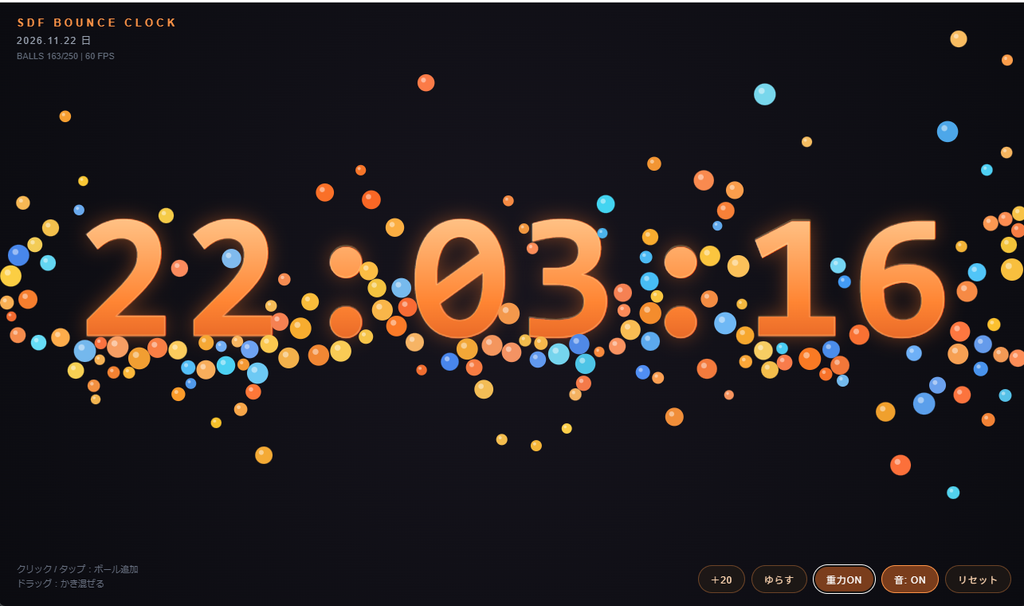
コードはこちら
<!DOCTYPE html>
<html lang="ja">
<head>
<meta charset="UTF-8">
<meta name="viewport" content="width=device-width,initial-scale=1,maximum-scale=1,user-scalable=no">
<title>SDF BOUNCE CLOCK</title>
<style>
  *{margin:0;padding:0;box-sizing:border-box}
  html,body{
    width:100%;height:100%;overflow:hidden;background:#0b0c10;
    font-family:"Helvetica Neue",Arial,"Hiragino Kaku Gothic ProN",Meiryo,sans-serif;
    -webkit-user-select:none;user-select:none;
  }
  #c{display:block;touch-action:none;cursor:grab}
  #c:active{cursor:grabbing}
  .ui{position:fixed;inset:0;pointer-events:none;color:#f3e8d8}
  .top{position:absolute;top:18px;left:22px}
  .logo{font-size:13px;letter-spacing:.32em;color:#ff9447;font-weight:700}
  .date{margin-top:6px;font-size:12px;letter-spacing:.14em;color:#9aa3b2}
  .stats{margin-top:4px;font-size:11px;color:#626b7a;font-variant-numeric:tabular-nums}
  .hint{position:absolute;bottom:18px;left:22px;font-size:11px;color:#687080;line-height:1.7}
  .btns{
    position:absolute;bottom:16px;right:20px;display:flex;gap:8px;
    flex-wrap:wrap;justify-content:flex-end;pointer-events:auto;
  }
  button{
    pointer-events:auto;background:rgba(36,28,22,.65);color:#ffd7b3;
    border:1px solid rgba(255,148,71,.35);border-radius:999px;
    padding:8px 15px;font-size:12px;letter-spacing:.06em;cursor:pointer;
    backdrop-filter:blur(8px);transition:background .15s,border-color .15s,transform .1s;
  }
  button:hover{background:rgba(255,120,40,.35);color:#fff;border-color:rgba(255,170,100,.8)}
  button:active{transform:scale(.95)}
  button.on{background:rgba(255,120,40,.45);border-color:#ff9447;color:#fff}
</style>
</head>
<body>
<canvas id="c"></canvas>
<div class="ui">
  <div class="top">
    <div class="logo">SDF BOUNCE CLOCK</div>
    <div class="date" id="date"></div>
    <div class="stats" id="stats"></div>
  </div>
  <div class="hint">クリック / タップ:ボール追加<br>ドラッグ:かき混ぜる</div>
  <div class="btns">
    <button id="add">+20</button>
    <button id="shake">ゆらす</button>
    <button id="grav">無重力</button>
    <button id="sound">音: OFF</button>
    <button id="reset">リセット</button>
  </div>
</div>

<script>
(() => {
'use strict';

const cvs = document.getElementById('c');
const ctx = cvs.getContext('2d', { alpha: false });
const elDate = document.getElementById('date');
const elStats = document.getElementById('stats');
const btnGrav = document.getElementById('grav');
const btnSound = document.getElementById('sound');

/* ---------- 定数 ---------- */
const SDF_SCALE = 3;         // SDF 1セルあたりのCSSピクセル数(高精細・低コスト)
const SDF_PAD = 8;           // SDFの余白セル数
const MAX_BALLS = 250;       // 空間ハッシュにより余裕で処理可能
const MIN_R = 6, MAX_R = 14;
const HASH_CELL = MAX_R * 2 + 4;
const STEP = 1 / 120;        // 固定タイムステップ
const SOLVER_ITERS = 3;      // 衝突反復回数(密集時の安定化)
const REST_WALL = 0.66;
const REST_BALL = 0.58;
const SQRT2 = Math.SQRT2;
const GLYPH_CHARS = '0123456789:';

/* ---------- 状態 ---------- */
let W = 0, H = 0, dpr = 1;
let fontSize = 120, fontStr = '', textY = 0;
let glyphCache = Object.create(null);
let slots = [];              // 現在時刻8文字の配置スロット
let timeStr = '', lastSec = -1;
let zeroGravity = false;
let soundOn = false;
let audioCtx = null, lastToneTime = 0;

// ボール配列 & スパーク演出
let balls = [];
let sparks = [];

// 空間ハッシュ(GCゼロの固定長配列リンクリスト)
let hashCols = 1, hashRows = 1;
let hashHead = new Int32Array(1);
const hashNext = new Int32Array(MAX_BALLS);

// ポインタ状態(クリックとドラッグを厳密に分離)
const ptr = {
  active: false, dragging: false,
  startX: 0, startY: 0, x: 0, y: 0, vx: 0, vy: 0
};

const pad2 = n => (n < 10 ? '0' + n : '' + n);
const rnd = (a, b) => a + Math.random() * (b - a);

/* ---------- Web Audio(控えめな衝突音) ---------- */
function playTick(speed) {
  if (!soundOn || !audioCtx) return;
  const now = audioCtx.currentTime;
  if (now - lastToneTime < 0.045) return; // 過密発音を抑制
  lastToneTime = now;
  const osc = audioCtx.createOscillator();
  const gain = audioCtx.createGain();
  const vol = Math.min(0.08, (speed - 240) / 8000);
  if (vol <= 0.005) return;
  osc.type = 'triangle';
  osc.frequency.setValueAtTime(320 + Math.min(580, speed * 0.45), now);
  osc.frequency.exponentialRampToValueAtTime(160, now + 0.055);
  gain.gain.setValueAtTime(vol, now);
  gain.gain.exponentialRampToValueAtTime(0.0001, now + 0.06);
  osc.connect(gain);
  gain.connect(audioCtx.destination);
  osc.start(now);
  osc.stop(now + 0.065);
}

/* ---------- 2パス距離変換(SDF生成コア) ---------- */
function computeDistanceField(binary, w, h, target) {
  const INF = 1e6;
  const dist = new Float32Array(w * h);
  for (let i = 0; i < w * h; i++) dist[i] = binary[i] === target ? 0 : INF;

  // Forward pass
  for (let y = 0; y < h; y++) {
    const row = y * w;
    for (let x = 0; x < w; x++) {
      let d = dist[row + x];
      if (d === 0) continue;
      if (x > 0) d = Math.min(d, dist[row + x - 1] + 1);
      if (y > 0) {
        const prev = row - w;
        d = Math.min(d, dist[prev + x] + 1);
        if (x > 0) d = Math.min(d, dist[prev + x - 1] + SQRT2);
        if (x < w - 1) d = Math.min(d, dist[prev + x + 1] + SQRT2);
      }
      dist[row + x] = d;
    }
  }
  // Backward pass
  for (let y = h - 1; y >= 0; y--) {
    const row = y * w;
    for (let x = w - 1; x >= 0; x--) {
      let d = dist[row + x];
      if (x < w - 1) d = Math.min(d, dist[row + x + 1] + 1);
      if (y < h - 1) {
        const next = row + w;
        d = Math.min(d, dist[next + x] + 1);
        if (x < w - 1) d = Math.min(d, dist[next + x + 1] + SQRT2);
        if (x > 0) d = Math.min(d, dist[next + x - 1] + SQRT2);
      }
      dist[row + x] = d;
    }
  }
  return dist;
}

/* ---------- 11文字のSDFを事前生成・キャッシュ ---------- */
function buildGlyphCache() {
  glyphCache = Object.create(null);
  const off = document.createElement('canvas');
  const octx = off.getContext('2d', { willReadFrequently: true });

  octx.font = fontStr;
  const digitW = Math.ceil(octx.measureText('8').width);
  const colonW = Math.ceil(octx.measureText(':').width * 1.15);
  const glyphH = Math.ceil(fontSize * 1.15);

  for (const ch of GLYPH_CHARS) {
    const advW = ch === ':' ? colonW : digitW;
    const gw = Math.ceil(advW / SDF_SCALE) + SDF_PAD * 2;
    const gh = Math.ceil(glyphH / SDF_SCALE) + SDF_PAD * 2;
    off.width = gw;
    off.height = gh;

    octx.setTransform(1, 0, 0, 1, 0, 0);
    octx.clearRect(0, 0, gw, gh);
    octx.save();
    octx.scale(1 / SDF_SCALE, 1 / SDF_SCALE);
    octx.font = fontStr;
    octx.textAlign = 'center';
    octx.textBaseline = 'middle';
    octx.fillStyle = '#fff';
    octx.fillText(ch, (gw * SDF_SCALE) * 0.5, (gh * SDF_SCALE) * 0.5);
    octx.restore();

    const rgba = octx.getImageData(0, 0, gw, gh).data;
    const solid = new Uint8Array(gw * gh);
    for (let i = 0; i < solid.length; i++) solid[i] = rgba[i * 4 + 3] > 110 ? 1 : 0;

    const dOut = computeDistanceField(solid, gw, gh, 1);
    const dIn = computeDistanceField(solid, gw, gh, 0);
    const sdf = new Float32Array(gw * gh);
    for (let i = 0; i < sdf.length; i++) sdf[i] = (dOut[i] - dIn[i]) * SDF_SCALE;

    glyphCache[ch] = {
      ch, advW, gw, gh,
      worldW: gw * SDF_SCALE,
      worldH: gh * SDF_SCALE,
      sdf
    };
  }

  // HH:MM:SS の8スロット配置を確定
  const pattern = '00:00:00';
  const gap = fontSize * 0.04;
  let totalW = 0;
  for (let i = 0; i < pattern.length; i++) {
    totalW += glyphCache[pattern[i]].advW + (i < pattern.length - 1 ? gap : 0);
  }
  let curX = (W - totalW) * 0.5;
  slots = [];
  for (let i = 0; i < pattern.length; i++) {
    const base = glyphCache[pattern[i]];
    slots.push({
      cx: curX + base.advW * 0.5,
      cy: textY,
      glyph: base
    });
    curX += base.advW + gap;
  }
  applyTimeToSlots(timeStr);
}

function applyTimeToSlots(str) {
  if (!slots.length || str.length !== 8) return;
  for (let i = 0; i < 8; i++) {
    slots[i].glyph = glyphCache[str[i]] || glyphCache['0'];
  }
}

/* ---------- SDFのバイリニア補間サンプリング ---------- */
function sampleSDF(g, u, v) {
  const x0 = Math.max(0, Math.min(g.gw - 2, Math.floor(u)));
  const y0 = Math.max(0, Math.min(g.gh - 2, Math.floor(v)));
  const fx = Math.max(0, Math.min(1, u - x0));
  const fy = Math.max(0, Math.min(1, v - y0));
  const idx = y0 * g.gw + x0;
  const s = g.sdf;
  const top = s[idx] * (1 - fx) + s[idx + 1] * fx;
  const bot = s[idx + g.gw] * (1 - fx) + s[idx + g.gw + 1] * fx;
  return top * (1 - fy) + bot * fy;
}

/* ---------- リサイズ ---------- */
function resize() {
  dpr = Math.min(window.devicePixelRatio || 1, 2);
  W = window.innerWidth;
  H = window.innerHeight;
  cvs.width = Math.round(W * dpr);
  cvs.height = Math.round(H * dpr);
  cvs.style.width = W + 'px';
  cvs.style.height = H + 'px';
  ctx.setTransform(dpr, 0, 0, dpr, 0, 0);

  fontSize = Math.max(48, Math.min(W * 0.175, H * 0.34));
  fontStr = `800 ${fontSize}px ui-monospace,"SFMono-Regular",Menlo,Consolas,monospace`;
  textY = H * 0.48;

  hashCols = Math.max(1, Math.ceil(W / HASH_CELL));
  hashRows = Math.max(1, Math.ceil(H / HASH_CELL));
  hashHead = new Int32Array(hashCols * hashRows);

  buildGlyphCache();

  for (const b of balls) {
    b.x = Math.min(Math.max(b.x, b.r), W - b.r);
    b.y = Math.min(Math.max(b.y, b.r), H - b.r);
  }
}

/* ---------- ボール・スパーク生成 ---------- */
function spawnBall(x, y, vx, vy) {
  const r = rnd(MIN_R, MAX_R);
  // オレンジ〜アンバー〜シアン系の洗練されたパレット
  const isWarm = Math.random() < 0.72;
  const hue = isWarm ? rnd(16, 46) : rnd(190, 218);
  const sat = isWarm ? rnd(86, 98) : rnd(75, 92);
  const lit = isWarm ? rnd(56, 68) : rnd(60, 72);
  balls.push({
    x, y, vx, vy, r,
    invM: 1 / (r * r),
    color: `hsl(${hue} ${sat}% ${lit}%)`
  });
  if (balls.length > MAX_BALLS) balls.shift();
}

function burst(x, y, count) {
  for (let i = 0; i < count; i++) {
    const a = rnd(0, Math.PI * 2), sp = rnd(60, 320);
    spawnBall(x + rnd(-10, 10), y + rnd(-10, 10), Math.cos(a) * sp, Math.sin(a) * sp - 90);
  }
}

function emitSpark(x, y, nx, ny, speed) {
  if (sparks.length > 90 || speed < 260) return;
  const n = speed > 600 ? 3 : 1;
  for (let i = 0; i < n; i++) {
    const ang = Math.atan2(ny, nx) + rnd(-0.8, 0.8);
    const sp = rnd(70, 220);
    sparks.push({
      x, y,
      vx: Math.cos(ang) * sp,
      vy: Math.sin(ang) * sp,
      life: 1
    });
  }
}

/* ---------- SDF衝突判定(滑らかな法線+最短押し出し) ---------- */
function collideSDF(b, doImpulse) {
  for (let i = 0; i < slots.length; i++) {
    const sl = slots[i];
    const g = sl.glyph;
    const hw = g.worldW * 0.5;
    const hh = g.worldH * 0.5;
    if (
      b.x + b.r < sl.cx - hw || b.x - b.r > sl.cx + hw ||
      b.y + b.r < sl.cy - hh || b.y - b.r > sl.cy + hh
    ) continue;

    const u = (b.x - (sl.cx - hw)) / SDF_SCALE;
    const v = (b.y - (sl.cy - hh)) / SDF_SCALE;
    const dist = sampleSDF(g, u, v);
    if (dist >= b.r) continue;

    // 中心差分で滑らかな法線を算出
    const gx = sampleSDF(g, u + 0.5, v) - sampleSDF(g, u - 0.5, v);
    const gy = sampleSDF(g, u, v + 0.5) - sampleSDF(g, u, v - 0.5);
    const len = Math.hypot(gx, gy);
    const nx = len > 1e-5 ? gx / len : 0;
    const ny = len > 1e-5 ? gy / len : -1;

    const pen = b.r - dist;
    b.x += nx * pen;
    b.y += ny * pen;

    if (doImpulse) {
      const vn = b.vx * nx + b.vy * ny;
      if (vn < 0) {
        const impact = -vn;
        b.vx -= (1 + REST_WALL) * vn * nx;
        b.vy -= (1 + REST_WALL) * vn * ny;
        // 接線摩擦(転がり感)
        const tx = -ny, ty = nx;
        const vt = b.vx * tx + b.vy * ty;
        b.vx -= vt * 0.04 * tx;
        b.vy -= vt * 0.04 * ty;
        if (impact > 260) {
          emitSpark(b.x - nx * b.r, b.y - ny * b.r, nx, ny, impact);
          playTick(impact);
        }
      }
    }
  }
}

/* ---------- 空間ハッシュによるボール同士衝突(重複なし走査) ---------- */
function resolvePair(a, b, doImpulse) {
  const dx = b.x - a.x, dy = b.y - a.y;
  const rSum = a.r + b.r;
  const d2 = dx * dx + dy * dy;
  if (d2 >= rSum * rSum || d2 < 1e-6) return;

  const d = Math.sqrt(d2);
  const nx = dx / d, ny = dy / d;
  const invSum = a.invM + b.invM;
  const corr = (rSum - d) / invSum;

  a.x -= nx * corr * a.invM;
  a.y -= ny * corr * a.invM;
  b.x += nx * corr * b.invM;
  b.y += ny * corr * b.invM;

  if (doImpulse) {
    const rv = (b.vx - a.vx) * nx + (b.vy - a.vy) * ny;
    if (rv < 0) {
      const imp = -(1 + REST_BALL) * rv / invSum;
      a.vx -= imp * nx * a.invM;
      a.vy -= imp * ny * a.invM;
      b.vx += imp * nx * b.invM;
      b.vy += imp * ny * b.invM;
    }
  }
}

function collideBallsSpatial(doImpulse) {
  const n = balls.length;
  hashHead.fill(-1);
  for (let i = 0; i < n; i++) {
    const b = balls[i];
    const cx = Math.max(0, Math.min(hashCols - 1, (b.x / HASH_CELL) | 0));
    const cy = Math.max(0, Math.min(hashRows - 1, (b.y / HASH_CELL) | 0));
    const idx = cy * hashCols + cx;
    hashNext[i] = hashHead[idx];
    hashHead[idx] = i;
  }

  for (let cy = 0; cy < hashRows; cy++) {
    const rowOff = cy * hashCols;
    for (let cx = 0; cx < hashCols; cx++) {
      let i = hashHead[rowOff + cx];
      while (i !== -1) {
        const a = balls[i];
        // 同一セル内の後続要素
        let j = hashNext[i];
        while (j !== -1) {
          resolvePair(a, balls[j], doImpulse);
          j = hashNext[j];
        }
        // 右・左下・下・右下の4隣接セルのみ走査(完全重複排除)
        if (cx + 1 < hashCols) {
          for (j = hashHead[rowOff + cx + 1]; j !== -1; j = hashNext[j]) resolvePair(a, balls[j], doImpulse);
        }
        if (cy + 1 < hashRows) {
          const nextRow = rowOff + hashCols;
          if (cx > 0) {
            for (j = hashHead[nextRow + cx - 1]; j !== -1; j = hashNext[j]) resolvePair(a, balls[j], doImpulse);
          }
          for (j = hashHead[nextRow + cx]; j !== -1; j = hashNext[j]) resolvePair(a, balls[j], doImpulse);
          if (cx + 1 < hashCols) {
            for (j = hashHead[nextRow + cx + 1]; j !== -1; j = hashNext[j]) resolvePair(a, balls[j], doImpulse);
          }
        }
        i = hashNext[i];
      }
    }
  }
}

/* ---------- 物理ステップ ---------- */
function physics(h) {
  const grav = zeroGravity ? 0 : 1480;
  for (let i = 0; i < balls.length; i++) {
    const b = balls[i];
    b.vy += grav * h;
    b.vx *= 1 - 0.22 * h;
    b.vy *= 1 - (zeroGravity ? 0.22 : 0.04) * h;

    // ドラッグによる流体的なかき混ぜ(ポインタ速度+斥力)
    if (ptr.dragging) {
      const dx = b.x - ptr.x, dy = b.y - ptr.y;
      const d2 = dx * dx + dy * dy;
      const rad = 165;
      if (d2 < rad * rad && d2 > 1) {
        const d = Math.sqrt(d2);
        const falloff = 1 - d / rad;
        b.vx += (ptr.vx * 14 + (dx / d) * 1400) * falloff * h;
        b.vy += (ptr.vy * 14 + (dy / d) * 1400) * falloff * h;
      }
    }

    b.x += b.vx * h;
    b.y += b.vy * h;

    // 壁
    if (b.x < b.r) { b.x = b.r; b.vx = Math.abs(b.vx) * REST_WALL; }
    else if (b.x > W - b.r) { b.x = W - b.r; b.vx = -Math.abs(b.vx) * REST_WALL; }
    if (b.y < b.r) { b.y = b.r; b.vy = Math.abs(b.vy) * REST_WALL; }
    else if (b.y > H - b.r) { b.y = H - b.r; b.vy = -Math.abs(b.vy) * REST_WALL; b.vx *= 0.96; }

    // 速度クランプ
    const sp = Math.hypot(b.vx, b.vy);
    if (sp > 2400) { b.vx *= 2400 / sp; b.vy *= 2400 / sp; }
  }

  // 反復ソルバー(初回でインパルス、残りで位置のめり込みを安定解消)
  for (let iter = 0; iter < SOLVER_ITERS; iter++) {
    const doImp = iter === 0;
    collideBallsSpatial(doImp);
    for (let i = 0; i < balls.length; i++) collideSDF(balls[i], doImp);
  }

  // スパーク更新
  for (let i = sparks.length - 1; i >= 0; i--) {
    const s = sparks[i];
    s.x += s.vx * h;
    s.y += s.vy * h;
    s.vy += 400 * h;
    s.life -= 2.8 * h;
    if (s.life <= 0) sparks.splice(i, 1);
  }

  ptr.vx *= 0.85;
  ptr.vy *= 0.85;
}

/* ---------- 描画 ---------- */
function render() {
  // 背景(綺麗な暗色グラデーション)
  const bg = ctx.createRadialGradient(W * 0.5, H * 0.48, 20, W * 0.5, H * 0.5, Math.max(W, H) * 0.72);
  bg.addColorStop(0, '#16141d');
  bg.addColorStop(1, '#08090d');
  ctx.fillStyle = bg;
  ctx.fillRect(0, 0, W, H);

  // 時刻(キャッシュ済みスロット位置と1pxもズレない描画)
  ctx.save();
  ctx.font = fontStr;
  ctx.textAlign = 'center';
  ctx.textBaseline = 'middle';
  const tg = ctx.createLinearGradient(0, textY - fontSize * 0.55, 0, textY + fontSize * 0.55);
  tg.addColorStop(0, '#ffd49e');
  tg.addColorStop(0.55, '#ff8533');
  tg.addColorStop(1, '#c94318');
  ctx.shadowColor = 'rgba(255,120,40,0.42)';
  ctx.shadowBlur = 26;
  ctx.fillStyle = tg;
  for (let i = 0; i < slots.length; i++) {
    ctx.fillText(slots[i].glyph.ch, slots[i].cx, slots[i].cy);
  }
  ctx.shadowBlur = 0;
  ctx.lineWidth = 1.2;
  ctx.strokeStyle = 'rgba(255,225,190,0.28)';
  for (let i = 0; i < slots.length; i++) {
    ctx.strokeText(slots[i].glyph.ch, slots[i].cx, slots[i].cy);
  }
  ctx.restore();

  // スパーク
  for (let i = 0; i < sparks.length; i++) {
    const s = sparks[i];
    ctx.fillStyle = `rgba(255,210,140,${s.life.toFixed(2)})`;
    ctx.fillRect(s.x - 1.5, s.y - 1.5, 3, 3);
  }

  // ボール
  for (let i = 0; i < balls.length; i++) {
    const b = balls[i];
    ctx.beginPath();
    ctx.arc(b.x, b.y, b.r, 0, 6.2832);
    ctx.fillStyle = b.color;
    ctx.fill();
    ctx.beginPath();
    ctx.arc(b.x - b.r * 0.3, b.y - b.r * 0.32, b.r * 0.28, 0, 6.2832);
    ctx.fillStyle = 'rgba(255,255,255,0.45)';
    ctx.fill();
  }

  // ドラッグ中のリング可視化
  if (ptr.dragging) {
    ctx.beginPath();
    ctx.arc(ptr.x, ptr.y, 44, 0, 6.2832);
    ctx.strokeStyle = 'rgba(255,165,90,0.35)';
    ctx.lineWidth = 1.5;
    ctx.stroke();
  }
}

/* ---------- メインループ ---------- */
let lastTime = performance.now(), acc = 0, fpsFrames = 0, fpsLast = lastTime, fps = 60;

function frame(now) {
  let dt = (now - lastTime) / 1000;
  lastTime = now;
  if (dt > 0.05) dt = 0.05;
  acc += dt;
  while (acc >= STEP) {
    physics(STEP);
    acc -= STEP;
  }

  const d = new Date();
  const s = d.getSeconds();
  if (s !== lastSec) {
    lastSec = s;
    timeStr = `${pad2(d.getHours())}:${pad2(d.getMinutes())}:${pad2(s)}`;
    applyTimeToSlots(timeStr); // 毎秒の処理は参照の差し替えのみ!

    // 1秒ごとの控えめなティック振動
    for (let i = 0; i < balls.length; i++) {
      balls[i].vy -= rnd(35, 95);
      balls[i].vx += rnd(-45, 45);
    }
    if (balls.length < 110) spawnBall(rnd(W * 0.15, W * 0.85), -18, rnd(-90, 90), 20);

    document.title = `${timeStr} | SDF BOUNCE CLOCK`;
    elDate.textContent = `${d.getFullYear()}.${pad2(d.getMonth() + 1)}.${pad2(d.getDate())} ${'日月火水木金土'[d.getDay()]}`;
  }

  fpsFrames++;
  if (now - fpsLast >= 500) {
    fps = Math.round(fpsFrames * 1000 / (now - fpsLast));
    fpsFrames = 0;
    fpsLast = now;
    elStats.textContent = `BALLS ${balls.length}/${MAX_BALLS}  |  ${fps} FPS`;
  }

  render();
  requestAnimationFrame(frame);
}

/* ---------- 入力イベント ---------- */
function getPos(e) {
  const r = cvs.getBoundingClientRect();
  return { x: e.clientX - r.left, y: e.clientY - r.top };
}

cvs.addEventListener('pointerdown', e => {
  const p = getPos(e);
  ptr.active = true;
  ptr.dragging = false;
  ptr.startX = ptr.x = p.x;
  ptr.startY = ptr.y = p.y;
  ptr.vx = ptr.vy = 0;
  cvs.setPointerCapture(e.pointerId);
});

cvs.addEventListener('pointermove', e => {
  if (!ptr.active) return;
  const p = getPos(e);
  ptr.vx = p.x - ptr.x;
  ptr.vy = p.y - ptr.y;
  ptr.x = p.x;
  ptr.y = p.y;
  if (!ptr.dragging && Math.hypot(p.x - ptr.startX, p.y - ptr.startY) > 8) {
    ptr.dragging = true;
  }
});

function endPtr() {
  if (ptr.active && !ptr.dragging) {
    burst(ptr.x, ptr.y, 8);
  }
  ptr.active = false;
  ptr.dragging = false;
}
cvs.addEventListener('pointerup', endPtr);
cvs.addEventListener('pointercancel', endPtr);

document.getElementById('add').onclick = () => burst(W * 0.5, H * 0.14, 20);
document.getElementById('shake').onclick = () => {
  for (const b of balls) {
    b.vx += rnd(-850, 850);
    b.vy -= rnd(250, 1000);
  }
};
btnGrav.onclick = () => {
  zeroGravity = !zeroGravity;
  btnGrav.classList.toggle('on', zeroGravity);
  btnGrav.textContent = zeroGravity ? '重力ON' : '無重力';
};
btnSound.onclick = () => {
  if (!audioCtx) audioCtx = new (window.AudioContext || window.webkitAudioContext)();
  if (audioCtx.state === 'suspended') audioCtx.resume();
  soundOn = !soundOn;
  btnSound.classList.toggle('on', soundOn);
  btnSound.textContent = soundOn ? '音: ON' : '音: OFF';
};
document.getElementById('reset').onclick = () => { balls = []; sparks = []; };
window.addEventListener('resize', resize);

/* ---------- 起動 ---------- */
const now = new Date();
timeStr = `${pad2(now.getHours())}:${pad2(now.getMinutes())}:${pad2(now.getSeconds())}`;
resize();
for (let i = 0; i < 60; i++) spawnBall(rnd(W * 0.1, W * 0.9), rnd(-H * 0.4, H * 0.25), rnd(-140, 140), 0);
requestAnimationFrame(frame);
})();
</script>
</body>
</html>
以上