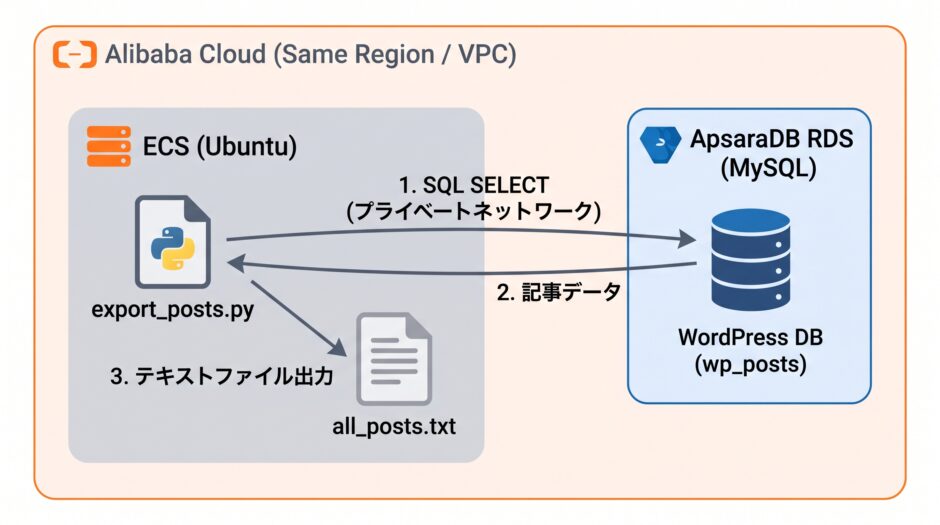
WordPress のデータを格納している RDS の MySQL からデータをエクスポートする話です。 エクスポートする目的はバックアップというわけではなく(バックアップは RDS の標準機能でまかなえている)、エクスポートした WordPress の記事を Qwen で分析するためです。
実施することはそんな難しいことではなく、Pythonで RDS に接続し、SQL を実行するだけです。
目次
Python のスクリプトの作成
RDS に接続し、SQL を実行する Python スクリプトを準備します。 今回は Python の環境準備から実施します。
Python のパッケージをインストールします。
$ sudo apt install python3-pymysql python3-bs4
MySQL の接続に必要な情報を準備します。 事前に設計書や設定書に記録していればそれを確認するだけですが、個人環境なのでwp-config.php のファイルを確認します。
そして、今回はwp-config.phpファイルの中にある MySQL 接続情報を読みにいくように Python スクリプトを作成することにします。 MySQLの接続情報を何か所にも記録するよりも1つにした方が良いため。
スクリプトは以下。 今は生成AIがあるので一瞬でベースは作成できます。 内容を一通り確認して、処理に問題が無いこと、セキュリティ的に問題が無いことは定性的ですが確認はしておきます。
処理としては、とりあえず画像データはqwenには読ませないのですが、画像があったことはわかるように <img>タグの alt 属性とファイル名を残しつつ HTML タグを除去して”all_posts.txt”にエクスポートします。
import re
import pymysql
from bs4 import BeautifulSoup

# ▼ 環境に合わせて wp-config.php のパスを指定
WP_CONFIG_PATH = "/var/www/html/wordpress/wp-config.php"
OUTPUT_FILE = "all_posts.txt"

def parse_wp_config(path):
    with open(path, "r", encoding="utf-8") as f:
        content = f.read()

    def get_define(name):
        m = re.search(rf"define\(\s*['\"]{name}['\"]\s*,\s*['\"]([^'\"]+)['\"]\s*\)", content)
        return m.group(1) if m else None

    prefix_m = re.search(r"\$table_prefix\s*=\s*['\"]([^'\"]+)['\"]", content)

    return {
        "db": get_define("DB_NAME"),
        "user": get_define("DB_USER"),
        "password": get_define("DB_PASSWORD"),
        "host": get_define("DB_HOST"),
        "prefix": prefix_m.group(1) if prefix_m else "wp_"
    }

def clean_html(html_text):
    if not html_text:
        return ""
    soup = BeautifulSoup(html_text, "html.parser")

    # <img> タグを [画像: alt属性 (ファイル名)] のテキストに置換して文脈を保持
    for img in soup.find_all("img"):
        alt = img.get("alt", "").strip()
        src = img.get("src", "").split("/")[-1]
        label = f"[画像: {alt} ({src})]" if alt else f"[画像: {src}]"
        img.replace_with(f"\n{label}\n")

    # 不要な script / style タグを削除
    for tag in soup(["script", "style"]):
        tag.decompose()

    text = soup.get_text(separator="\n")
    # 連続する空行を整理
    lines = [line.strip() for line in text.splitlines() if line.strip()]
    return "\n".join(lines)

def main():
    cfg = parse_wp_config(WP_CONFIG_PATH)
    host_parts = cfg["host"].split(":")
    host = host_parts[0]
    port = int(host_parts[1]) if len(host_parts) > 1 else 3306

    conn = pymysql.connect(
        host=host,
        port=port,
        user=cfg["user"],
        password=cfg["password"],
        database=cfg["db"],
        charset="utf8mb4",
        cursorclass=pymysql.cursors.DictCursor
    )

    table_posts = f"{cfg['prefix']}posts"
    sql = f"""
        SELECT ID, post_date, post_title, post_name, post_content
        FROM {table_posts}
        WHERE post_status = 'publish' AND post_type = 'post'
        ORDER BY post_date ASC
    """

    with conn.cursor() as cursor:
        cursor.execute(sql)
        rows = cursor.fetchall()

    conn.close()

    total_chars = 0
    with open(OUTPUT_FILE, "w", encoding="utf-8") as out:
        for row in rows:
            cleaned_body = clean_html(row["post_content"])
            block = (
                f"===\n"
                f"ID: {row['ID']} | Date: {row['post_date']} | Slug: {row['post_name']}\n"
                f"Title: {row['post_title']}\n"
                f"---\n"
                f"{cleaned_body}\n"
                f"===\n\n"
            )
            out.write(block)
            total_chars += len(block)

    print(f"抽出完了: {len(rows)} 記事")
    print(f"総文字数: {total_chars:,} 文字")
    print(f"出力ファイル: {OUTPUT_FILE}")

if __name__ == "__main__":
    main()
エクスポートの実行
python スクリプトを実行し、MySQL上の WordPress 記事データをエクスポートします。
$ python3 ./export_wppost.py
抽出完了: 486 記事
総文字数: 2,133,016 文字
出力ファイル: all_posts.txt
486記事、213万文字が抽出できました。 1記事当たり4,382文字。 2019年に始めたブログですがまさにチリも積もればというやつですね。
以上